



































Integrating an External Console with the KubeDB Platform
This guide is for Cloud Service Providers (CSPs) and ISVs who already operate their own web console and want to embed the KubeDB Platform console for their end users, so that a user who signs in to the CSP console is transparently signed in to the KubeDB console hosted on a subdomain — with no second login prompt.
All endpoints referenced here are documented in the KubeDB Platform API Reference. The most relevant pages are:
- Administrative-Org Admin — the admin user APIs used to provision and maintain the mirrored user.
- Public & Basic-auth User APIs — the
public
POST /user/signinendpoint that establishes the browser session. - Authenticated User APIs —
GET /user/signoutand other session-scoped calls. - Client Organizations — the managed-service-provider model for granting each user scoped access to clusters.
1. Goal
A CSP already has a console where its customers sign in. The CSP wants to offer KubeDB (managed databases) as a feature. The KubeDB Platform console is hosted on a subdomain of the CSP’s console, for example:
| Role | Host |
|---|---|
| CSP console (the CSP’s existing product; identity provider) | https://console.acme.com |
| KubeDB Platform console and API server (per-CSP deployment) | https://db.acme.com |
The requirement: when a user logs into the CSP console, the CSP backend should seamlessly log that same user into the KubeDB console. The user’s identity of record lives in the CSP console; the KubeDB Platform holds a mirror of that identity that the CSP backend controls.
This is achieved with two flows:
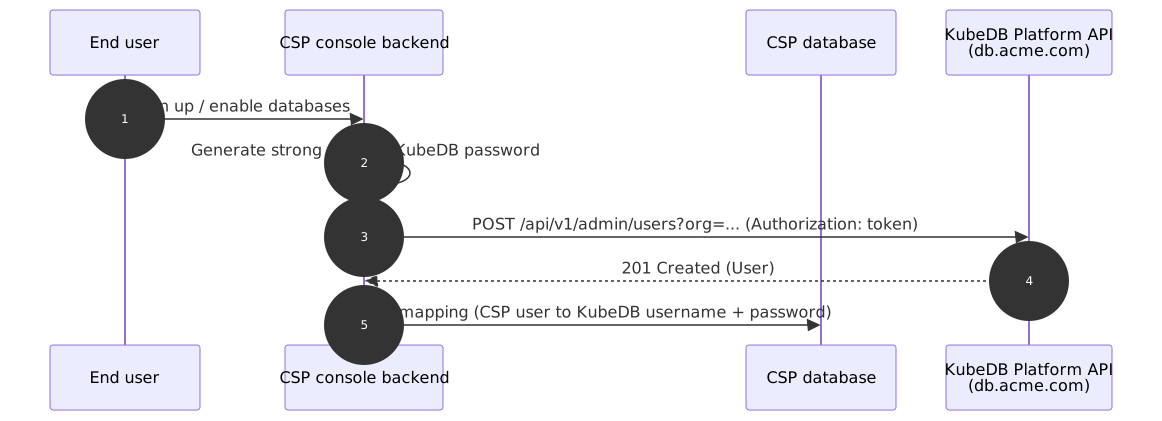
- Provisioning (once per user) — the CSP backend creates a mirrored KubeDB user with the admin API, authenticating with a site-admin personal access token. The CSP generates and stores that user’s KubeDB password; the end user never sees or types it.
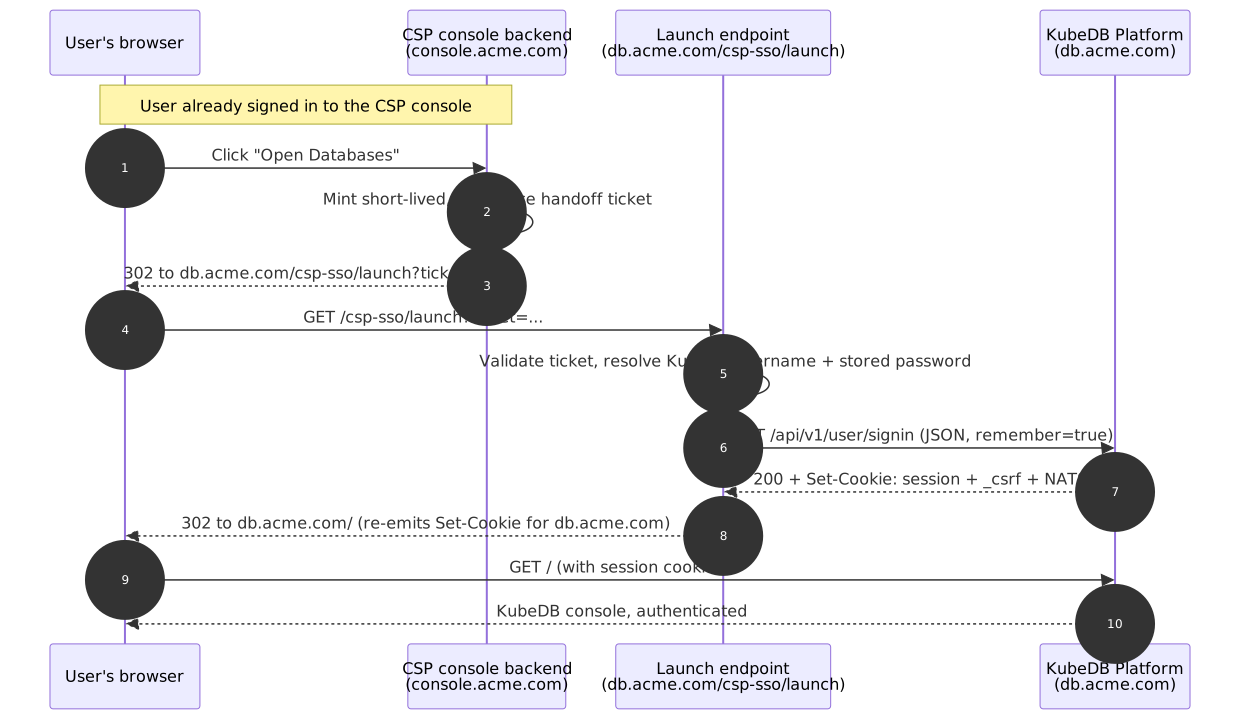
- Session handoff (every CSP login) — the CSP backend performs a server-side sign-in to the KubeDB Platform on the user’s behalf, captures the resulting session cookies, and hands them to the user’s browser scoped to the KubeDB subdomain.
Because both consoles share the registrable domain acme.com, the browser treats
console.acme.com → db.acme.com as same-site, so the handoff works cleanly.
2. Prerequisites
- A per-CSP KubeDB Platform deployment reachable at the subdomain (
https://db.acme.com), serving both the web console and the/api/v1REST API. - A site-admin personal access token issued to the CSP, held only by the CSP
backend — never shipped to a browser. It is sent as an
Authorization: token <TOKEN>header and authorizes the/api/v1/admin/*calls (which require theadmin_of_administrative_orgrelation). See Administrative-Org Admin. - The administrative organization slug (e.g.
appscode) to pass as the?org=context on admin calls. - TLS on both hosts. All calls below assume
https://. - The mirrored KubeDB users must not have 2FA enabled —
POST /user/signinrejects 2FA-enrolled accounts with HTTP405. Since the CSP console is the identity provider, leave 2FA off on the mirror and enforce MFA in the CSP console instead.
Throughout, replace the placeholders:
db.acme.com→ your KubeDB Platform subdomain (shown as<akp-host>in the API reference)$AKP_TOKEN→ your site-admin tokenappscode→ your administrative-org slug
3. Phase 1 — Provision the mirrored user (once, at CSP signup)
When a customer signs up (or is first granted database access) on the CSP console, the CSP backend creates the corresponding user in the KubeDB Platform. Do not use the public signup flow — user creation is an admin operation.
The CSP backend generates a strong random password for the KubeDB identity and stores it (encrypted) alongside the CSP user record. This password is an internal credential used only for the server-side handoff in Phase 2; the end user never learns it.
3.1 Create the user
POST /api/v1/admin/users?org=<slug> — body is a CreateUserOption
(reference):
curl -X POST 'https://db.acme.com/api/v1/admin/users?org=appscode' \
  -H "Authorization: token $AKP_TOKEN" \
  -H 'Content-Type: application/json' \
  --data-raw '{
    "username": "acme-user-42",
    "email": "jane@customer.example.com",
    "password": "<STRONG_RANDOM_PASSWORD_GENERATED_AND_STORED_BY_CSP>",
    "full_name": "Jane Doe",
    "must_change_password": false,
    "send_notify": false
  }'
| Field | Type | Required | Notes for CSP integration |
|---|---|---|---|
username | string | yes | Stable, collision-free (e.g. prefix with your tenant slug). |
email | string | yes | The user’s email. |
password | string | yes | CSP-generated random secret; store it encrypted. |
full_name | string | no | Display name. |
must_change_password | boolean | no | Set false — a forced change breaks the automated handoff. |
send_notify | boolean | no | Set false — the CSP owns all user communication. |
Response: 201 Created — the created User. Persist the mapping
CSP user ↔ KubeDB username in the CSP database.
3.2 Keep the profile in sync (optional)
When the user edits their name/email in the CSP console, mirror it with POST /api/v1/admin/users/{username}/update?org=<slug> — body is a Profile
(reference):
curl -X POST 'https://db.acme.com/api/v1/admin/users/acme-user-42/update?org=appscode' \
  -H "Authorization: token $AKP_TOKEN" \
  -H 'Content-Type: application/json' \
  --data-raw '{
    "name": "acme-user-42",
    "full_name": "Jane A. Doe",
    "email": "jane@customer.example.com",
    "keep_email_private": false,
    "language": "en-US",
    "description": "Mirrored from CSP console"
  }'
3.3 Rotate the password (optional)
If the CSP rotates the stored KubeDB credential, push the new value with POST /api/v1/admin/users/{username}/change-password?org=<slug> — body is an
UpdatePasswordParams
(reference):
curl -X POST 'https://db.acme.com/api/v1/admin/users/acme-user-42/change-password?org=appscode' \
  -H "Authorization: token $AKP_TOKEN" \
  -H 'Content-Type: application/json' \
  --data-raw '{ "password": "<NEW_STRONG_RANDOM_PASSWORD>", "retype": "<NEW_STRONG_RANDOM_PASSWORD>" }'
3.4 Deprovision (on CSP account deletion)
When a CSP user is disabled or deleted, revoke KubeDB access with DELETE /api/v1/admin/users/{username}?org=<slug> (or PATCH the user with active:false /
prohibit_login:true to keep the record). See
Edit / Delete user.
4. Phase 2 — Session handoff (every time the user opens the KubeDB console)
The public sign-in endpoint POST /api/v1/user/signin authenticates a username +
password and, on success, sets the session, CSRF (_csrf), and NATS cookies — the same
cookies the web console relies on
(reference). The trick is
that these cookies are obtained by the CSP backend server-to-server, then delivered to the
user’s browser so it holds a valid db.acme.com session.
4.1 The sign-in call
POST /api/v1/user/signin — body is a SignInParams:
curl -X POST 'https://db.acme.com/api/v1/user/signin' \
  -H 'Content-Type: application/json' \
  --data-raw '{
    "username": "acme-user-42",
    "password": "<STORED_KUBEDB_PASSWORD>",
    "remember": true
  }' \
  -c cookie.txt -D headers.txt
| Field | Type | Required | Description |
|---|---|---|---|
username | string | yes | The mirrored KubeDB username. |
password | string | yes | The CSP-stored password for that user. |
remember | boolean | no | Persist the session across browser restarts. |
Response: 200 OK with no body. The Set-Cookie headers (captured in headers.txt,
jarred in cookie.txt) carry the session, _csrf, and NATS cookies. Non-200 statuses:
404 (no such user), 405 (login prohibited / inactive / 2FA enrolled), 422
(validation error).
CSRF on later calls. Any subsequent state-changing API call made server-side with these cookies must echo the
_csrfcookie value in anX-Csrf-Tokenheader, e.g.:curl -X POST 'https://db.acme.com/api/v1/user/settings/profile' \ -H 'Content-Type: application/json' \ -H "X-Csrf-Token: <VALUE_OF__csrf_COOKIE>" \ -b cookie.txt --data-raw '{ ... }'
4.2 Delivering the cookies to the browser
The CSP backend can sign in, but a backend cannot set cookies in the browser for a domain
other than the one that served the response. So the piece that re-emits the captured
cookies must run on the KubeDB host itself. Host a small launch endpoint on the KubeDB
subdomain, e.g. https://db.acme.com/csp-sso/launch, in one of two ways:
- Reverse proxy a path prefix (
db.acme.com/csp-sso/*) on the KubeDB ingress to the CSP backend, or - run a tiny CSP-owned handler co-located on the subdomain.
Either way the launch endpoint is same-origin with the KubeDB console, so the Set-Cookie
headers it returns are accepted by the browser for db.acme.com.
The end-to-end handoff:
- User is already authenticated on
console.acme.comand clicks “Open Databases”. - The CSP console backend mints a short-lived, single-use handoff token (signed, ~30 s
TTL) identifying the CSP user, and redirects the browser to
https://db.acme.com/csp-sso/launch?ticket=<handoff-token>. - The launch endpoint validates the ticket, looks up the mapped KubeDB username + stored password, and performs the server-side sign-in (§4.1).
- The launch endpoint copies the sign-in response’s
Set-Cookieheaders onto its own redirect response to the browser, then302s tohttps://db.acme.com/. - The browser now holds a valid KubeDB session cookie for
db.acme.comand loads the KubeDB console fully authenticated — no login prompt.
4.3 Optional: shared-domain single sign-on
If your KubeDB Platform deployment is configured to set its session cookie with
Domain=.acme.com (the shared parent domain) instead of the default host-only cookie, the
same session is valid on both console.acme.com and db.acme.com. In that case the
launch endpoint can set the cookie once and the user moves between the two consoles without
re-handoff. This requires the KubeDB Platform cookie-domain setting; confirm with your
deployment before relying on it. The per-launch flow in §4.2 works regardless and is the
safe default.
5. Granting database access (Client Organizations)
Provisioning a mirrored user establishes an identity, but that user still needs access to clusters and databases. The KubeDB Platform’s managed-service-provider model — Client Organizations — is designed exactly for CSPs. As a site admin, the CSP:
- Creates a client organization and imports spoke clusters into it —
POST /api/v1/user/client/createandPOST /api/v1/user/client/{orgname}/add-cluster(Client Org Management). - Creates a per-cluster user with scoped permissions and (optionally) fetches a kubeconfig
for them —
POST /api/v1/clusters/{owner}/{cluster}/permission/user/createandGET /api/v1/clusters/{owner}/{cluster}/permission/user/{id}/kubeconfig(Cluster User Permissions).
Map each CSP customer to a client organization and each mirrored user to that org’s per-cluster permission set, so that when the user lands on the KubeDB console (via the handoff above) they see exactly the clusters and databases they are entitled to. The equivalent UI walkthrough is in the Client Organization guide.
6. Logout
When the user logs out of the CSP console, also terminate the KubeDB session so a shared
browser can’t keep the console open. Call GET /api/v1/user/signout with the user’s cookies
and CSRF token (reference):
curl -X GET 'https://db.acme.com/api/v1/user/signout' \
  -H "X-Csrf-Token: <VALUE_OF__csrf_COOKIE>" \
  -b cookie.txt
If you use shared-domain SSO (§4.3), clear the .acme.com cookie on logout as well.
7. API summary
| Step | When | Method & path | Auth |
|---|---|---|---|
| Create mirrored user | CSP signup (once) | POST /api/v1/admin/users?org=<slug> | Authorization: token (site admin) |
| Sync profile | On CSP profile edit | POST /api/v1/admin/users/{username}/update?org=<slug> | Authorization: token (site admin) |
| Rotate password | On credential rotation | POST /api/v1/admin/users/{username}/change-password?org=<slug> | Authorization: token (site admin) |
| Deprovision | On CSP account deletion | DELETE /api/v1/admin/users/{username}?org=<slug> | Authorization: token (site admin) |
| Grant cluster access | On entitlement change | Client-org + permission APIs (§5) | Authorization: token (site admin / org admin) |
| Server-side sign-in | Each console open | POST /api/v1/user/signin | Mirror user password → sets cookies |
| Authenticated API call | As needed | any /api/v1/... | Session cookie + X-Csrf-Token: <_csrf> |
| Logout | On CSP logout | GET /api/v1/user/signout | Session cookie + X-Csrf-Token: <_csrf> |
Explore any of these interactively in the Interactive API Reference.
8. Security checklist
- Site-admin token stays server-side, in a secret manager. Rotate it periodically. Its compromise means full control of every mirrored user. Generate/manage tokens via the access-token APIs.
- Stored KubeDB passwords are internal credentials: generate them randomly (high entropy), encrypt at rest, and never expose them to the browser or the end user.
- Handoff ticket must be short-lived (seconds), single-use, signed/encrypted, and bound to the authenticated CSP session — it is the only thing standing between a URL and a KubeDB session. Never put the KubeDB password in the URL.
- Cookie flags: ensure the session cookies delivered to the browser are
Secure,HttpOnly, andSameSite=Lax(Lax suffices becauseconsole.acme.com→db.acme.comis same-site and the handoff is a top-level navigation). - TLS everywhere.
- No 2FA on mirrors (see §2); enforce MFA in the CSP console instead.
- Logout propagation (§6) so a KubeDB session never outlives the CSP session on a shared device.
- Deprovisioning (§3.4) so access is revoked in both consoles together.